
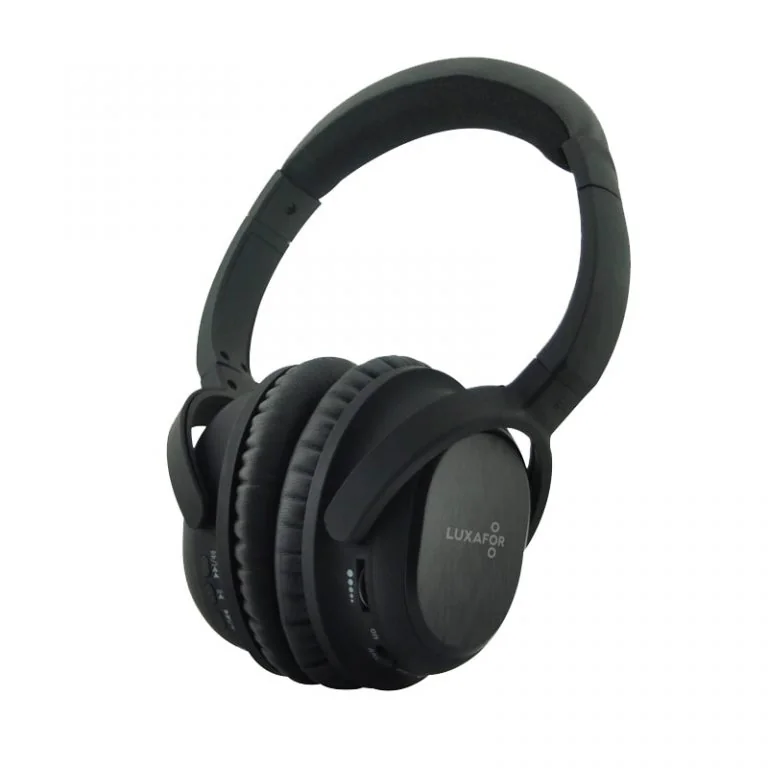
The Luxafor ANC Headphones are over-ear headphones with active noise cancelling. You can use them over Bluetooth, with the noise cancelling on or off, or with the audio cable. This manual covers the controls, charging, pairing, calls, music, battery life and specifications.
What’s in the box #
- 1 pair of headphones
- 1 detachable audio cable
- 1 ¼ inch stereo plug adapter
- 1 dual-plug adapter for aircraft
- 1 USB charging cable
- 1 small mesh bag
- 1 hard shell case
- 1 gift box
Get to know your headphones #
Left ear cup #
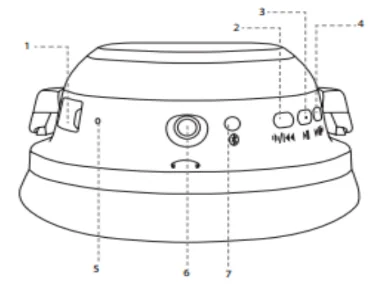
- USB socket, for charging
- Volume down and previous song button (Bluetooth only)
- Multifunction button (MFB): power on and off, pairing, and make, answer, end or reject a call
- Volume up and next song button (Bluetooth only)
- Microphone
- 3.5 mm audio jack
- Bluetooth LED
Right ear cup #
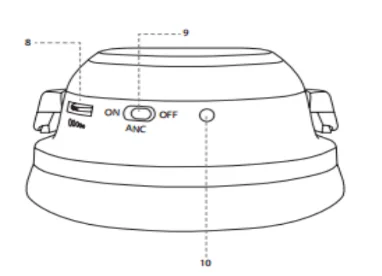
- Volume wheel, for Bluetooth, noise cancelling and wired use
- Noise cancelling ON/OFF switch
- Noise cancelling LED
Two volume controls #
The headphones have two volume controls because you can use them wired, with noise cancelling, or over Bluetooth.
- The wheel on the right ear cup (8) works in all modes.
- The buttons on the left ear cup (2 and 4) work only over Bluetooth. To change the volume with them, press and hold the button until you reach the level you want.
Adjust the headband #
Adjust the headband so the ear cups sit comfortably over your ears. A good fit gives you the best comfort and the best noise cancelling.
Charge the headphones #
- Plug the USB charging cable into a USB charger or a USB wall socket.
- Plug the other end into the micro USB socket on the left ear cup.
- Wait about 3 hours. The LED is red while the headphones charge. It turns off when they are full.
Do not charge the headphones from a computer USB port. It charges more slowly and wastes energy. Charge them fully before you use them for the first time.
Turn the headphones on and off #
- Turn on: press and hold the MFB for about 4 seconds. The Bluetooth LED flashes green and red quickly, and you hear a rising tone.
- Turn off: press and hold the MFB for 5 to 6 seconds. The Bluetooth LED turns solid red, and you hear a falling tone.
Pair with your phone #
Pair the headphones with a phone before you use them for the first time. The steps can differ a little between phones. If you get stuck, check your phone’s manual.
- Press and hold the MFB for about 4 seconds. The Bluetooth LED alternates between green and red. The headphones are now in pairing mode.
- On your phone, turn on Bluetooth and search for nearby devices.
- Select LUX ANC when it appears. If your phone asks for a password, enter
0000. - When pairing works, the Bluetooth LED flashes green every 4 seconds.
If pairing fails, turn off the headphones and try again. After the first pairing, the headphones reconnect to the last paired phone each time you turn them on.
Use active noise cancelling #
- Set the ANC switch on the right ear cup to ON. The noise cancelling LED lights up blue.
- Adjust the volume.
- You may hear a slight hiss when you turn noise cancelling on. This is normal and stops after a few seconds.
- When the battery is low, the noise cancelling LED gets dim.
- When the battery is empty, noise cancelling turns off. The audio keeps playing.
- In a quiet place you do not need noise cancelling. Turn it off and the headphones work as normal headphones, without using battery.
- You can use noise cancelling and Bluetooth at the same time.
- Turn the ANC switch off when you are not using the headphones. This saves battery.
Make calls #
| To do this | Do this |
|---|---|
| Answer a call | Press the MFB once |
| End a call | Press the MFB once |
| Reject a call | Hold the MFB for 3 seconds |
| Redial the last number | Press the MFB twice when no call is active |
| Swap calls | Hold the MFB for 3 seconds during a call |
Voice dialing #
If your phone has voice dialing, press and hold the MFB and say the voice tag. You must record the voice tag, which is the name of the person, in your phone first. See your phone’s manual.
Play music #
| To do this | Do this |
|---|---|
| Play or pause | Press the MFB once |
| Next song | Press the next song button (4) on the left ear cup |
| Previous song | Press the previous song button (2) on the left ear cup |
Use the audio cable #
Use the audio cable with devices that do not have Bluetooth. You can also use it when the headphones are not charged. Plug it into the 3.5 mm jack on the left ear cup. Use the ¼ inch stereo plug adapter or the dual-plug adapter for aircraft when the device needs one.
Battery life #
Battery life depends on which functions you use and how often. These times are for continuous use:
| Mode | Battery life |
|---|---|
| Bluetooth only | 15 hours |
| Noise cancelling only | 30 hours |
| Bluetooth and noise cancelling | 12 hours |
Technical specifications #
| Bluetooth | Version 4.1, range 10 m or more |
|---|---|
| Chipset | CSR8645 with aptX |
| Noise cancellation | 85% |
| Speakers | 40 mm neodymium |
| Impedance | 32 ohm |
| Wired connection | 3.5 mm jack |
| Battery | Li-polymer, 12 to 30 hours depending on mode |
| Charging | Micro USB, about 3 hours |
Safety and care #
- Turn the volume down before you plug the headphones into a sound source.
- Do not wear the headphones near traffic, or in any situation where you need to hear what is around you.
- Listening to loud music for a long time can damage your hearing. Avoid very high volume.
- Do not open or modify the headphones. Have them serviced only by an authorized dealer. See the warranty terms and procedure.
- Keep the headphones and the battery away from children.
Troubleshooting #
If the headphones do not connect to your phone:
- Turn the headphones off and make sure they are charged.
- Make sure the headphones are paired with your phone. See Pair with your phone.
- Keep the headphones within 10 m (33 ft) of your phone, with no walls or electronics in between.
- Turn on Bluetooth on your phone.
- To reset some functions, plug the headphones in to charge, then unplug them.
Still need help? #
Send us a message and tell us:
- which device you have and where you bought it
- what you see or hear, and what you expected
- which steps on this page you have already tried
- your phone model and operating system
- your order number, if you have one
A short video or photo of the problem helps us fix it faster. If the problem is with the connection, film the headphones at the moment they try to connect.