
7 Most Common To-Do List Mistakes and How To Fix Them

To-do lists are something that most of us have tried to use for one or another reason at least once in our lifetime. But did you know that 41% of to-do tasks are never completed?
The only way to truly understand how to use a to-do list appropriately is to stop making the 7 most common to-do list mistakes, and we’re here to help you avoid them all!
Mistake #1: Tasks on the list don't have set deadlines
The most common to-do list mistake people make is not setting a specified deadline/goal for the lineup. A good task management list works only when you set a deadline for completion.
Our tip would be to schedule deadlines as near to the present as possible by making daily and weekly lists rather than monthly lists. When you evoke a sense of urgency for yourself, there’s no room for forgetting, procrastination, and “getting busy” with unimportant tasks.
Mistake #2: Too many items on the list
We’re afraid to say, but “the more the merrier” will most likely fail when it comes to lists. Once you have categorized the list you’re about to make by a deadline, we highly advise setting the maximum number of items allowed on this list. This will help you prioritize what really has to be done and what can wait or be eliminated from your mind completely. The most appraised form of the to-do list is a daily list.
With this category, we would advise choosing the 3 most important/urgent tasks that you can actually manage to finish today. That will help you gain a deeper understanding of the importance of the things you might wish to put on a list and understand how many of those are actually unnecessary to be included.
Too many items on your list are found to make you feel intimidated and more stressed because a bigger number of problems to be solved makes our brain think of them as “neverending stories”.
Mistake #3: Not knowing which tasks to put on the list
A major mistake being made at this point is not knowing how to choose the most important tasks out of all the things you might feel the need to work on that particular day.
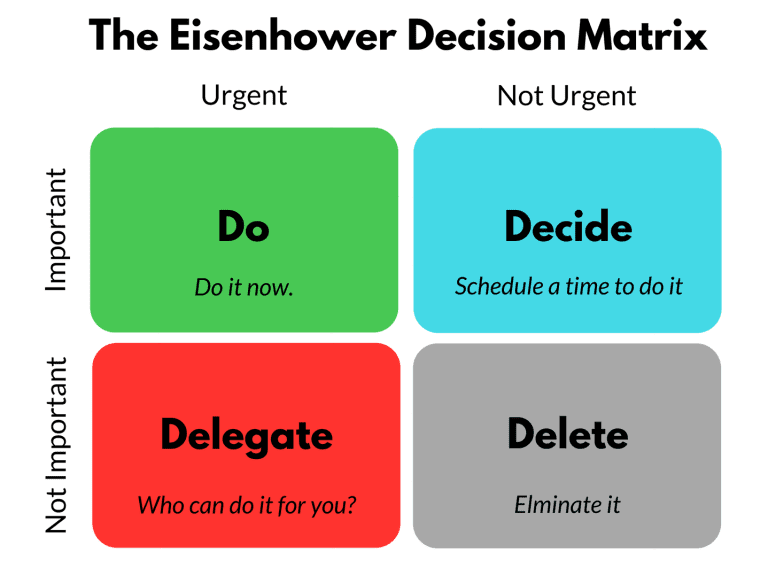
A solution to this is to follow The Eisenhower Decision Matrix table (see the picture below).
It shows a great way of organizing thoughts and to-do lists on which tasks are important, which tasks could be assigned to your colleagues’ list and which tasks are actually worthless to spend time on, so you eliminate them.
The best way to make your to-do lists work is to choose 3 items daily from the “Decide” quadrant (important but not urgent), and delegate the other tasks accordingly to this matrix.
Mistake #4: Lists that have mixed up goals and context
We’ve all made to-do lists in our minds that contain not only work-related tasks like “finish project X” or “call CEO of Y company” but unrelated tasks, such as “do the laundry”, ”pick up the kids from daycare”, call my best friend”, buy a new lamp for bedroom” etc…
The problem with not sorting these tasks is the amount of information you start to clutter your brain with. And, the more uncategorized information our brain has, the more stressed it becomes. Our brain is always trying to understand, what should be done first and how to connect these many tasks into one plan of how to do it all.
If you truly enjoy making lists for everything, then please do! Only remember to make separate lists for work, household to-do lists, etc.
Mistake #5: Not tracking the progress
Too many people don’t know how to track progress. They make to-do lists and tick them off when finished. But just ticking something off the list does not make you evaluate your work efficiency with each task.
Luckily for us, there are many task management and workflow services that offer to do exactly that for you. Prioritize what to put on a list and make your day-to-day life easier by creating deadlines, organizing tasks and archiving the finished ones.
These are many solutions that can make you gain a deeper understanding of your work ethic, efficiency, and time management. By accessing such data you can learn for the future and thus become more and more efficient at achieving your goals. Some examples of such services are Asana, Evernote, IDoneThis, Trello, etc.
Mistake #6: Not understanding where to start after the list is ready
Starting with a random task can increase your risk of multitasking the whole day. And you already know that jumping from one task to another one, because you cannot decide where to start, is not smart.
Advice from countless leaders worldwide is to start the day with the most unpleasant project on your list. By “unpleasant” we mean “most important”, and by “most important” we mean the task you’re most likely to procrastinate on.
You might know this from Mark Twain’s “eat the frog first ” quote. This works because you’re more likely to enjoy completing the next tasks on your list once you have completed the first one. Also, it is a great way to discipline yourself and gain higher self-respect when you acknowledge the completion of the hardest to-do item.
Mistake #7: Creating the list on the day
This is a very common mistake that can lead to counterproductive list-making. Not only doing this makes you start the day off with a stressful brainstorming session. It can also make you become less organized.
Experienced to-do list users always advise making the checklist in the evening before. A great way to do this is by planning for the next day just before leaving the office. If you use this method, you relieve your brain of thinking about tasks outside working hours.
Guidelines for building a list that works
-
Specify the type of list by a deadline, based on your needs. (Make daily lists rather than monthly plans.)
- Set a limited number of items on your list and stick with it. (We advise a set number of 3 tasks per day)
- Use the Eisenhower Matrix to categorize tasks by importance and urgency. (Become aware of what needs your attention and what is actually just a distraction)
- Specify lists and don't mix your household to-dos with tasks at work. (Create separate lists if you wish to have everything organized)
- Use workflow and task management tools to help track your efficiency
- Eat the frog first - always start with the hardest task.
- Prepare the list in advance. (Best time to prepare for the next day is just before leaving the office)
To-do lists are supposed to increase productivity, not lead to a self-loathing cycle of setting a goal, missing it, feeling bad, and repeating the same process once more. So, if your system hasn’t been working for you, try the tips above to feel better about your work and get more done.
Do you want to build and maintain new habits? Get your free PDF version of the Don't Break The Chain calendar and start today!
Do you want to build and maintain new habits? Get your free PDF version of the Don't Break The Chain calendar and start today!
7 Most Common To-Do List Mistakes and How To Fix Them








Tags
Archives
- June 2026
- May 2026
- March 2026
- January 2026
- December 2025
- November 2025
- October 2025
- September 2025
- August 2025
- July 2025
- June 2025
- May 2025
- February 2025
- January 2025
- December 2024
- November 2024
- October 2024
- September 2024
- August 2024
- July 2024
- June 2024
- May 2024
- April 2024
- March 2024
- February 2024
- January 2024
- December 2023
- November 2023
- October 2023
- September 2023
- August 2023
- July 2023
- June 2023
- May 2023
- April 2023
- March 2023
- February 2023
- January 2023
- December 2022
- November 2022
- October 2022
- September 2022
- August 2022
- July 2022
- June 2022
- May 2022
- April 2022
- March 2022
- February 2022
- January 2022
- December 2021
- November 2021
- October 2021
- September 2021
- August 2021
- July 2021
- June 2021
- May 2021
- April 2021
- March 2021
- February 2021
- January 2021
- December 2020
- November 2020
- October 2020
- September 2020
- August 2020
- July 2020
- June 2020
- May 2020
- April 2020
- March 2020
- December 2019
- November 2019
- October 2019
- September 2019
- August 2019
- July 2019
- April 2019
- March 2019
- January 2019
- December 2018
- November 2018
- October 2018
- September 2018
- August 2018
- July 2018
- June 2018
- August 2017
- May 2017
- April 2017
- February 2017
- January 2017
- November 2016
- October 2016
- September 2016
- August 2016
- July 2016
- June 2016
- May 2016
- April 2016
- March 2016
- February 2016
- January 2016

