
Productivity During the Pandemic: 7 Tips for Managers to Share

The coronavirus has affected how many businesses are run and have stretched the boundaries of workplace flexibilities unexpectedly. Organizations that would typically follow the traditional norms and cultures of the workplace and its system have reverted to the more modern remote working approach to keep up with productivity while ensuring that everyone is safe.
Even those organizations that had the remote working system had to expand that considerably because of the pandemic. It is clear that nothing is the same again, and everybody has to find a way to adapt. Companies must continue to run, and employees must continue to be productive regardless.
This puts a strain on the managers as the onus is on them to ensure continuous productivity from the employees. To help them out, here are some tips from college papers on how managers can ensure productivity during the pandemic amidst the new work from home system.
1. Know your employees and their interests

Source: Unsplash
There is much information that employees receive that are not so important to them. Up to 62% of emails that they receive are not vital to them. This much useless information overwhelms them and makes them ignore most messages that they receive. This will lead to them missing out on the most important ones as well.
To get their attention, you have to send them only messages that are relevant to them, no more no less. The fact that they are working from home makes it harder for you to have their attention. This means that you need a deep understanding of what they need and what interests them.
This might lead you to segregate your team based on their topics of interest and the kind of information relevant to them.
2. Create the ideal content type
When it comes to communication with a group of individuals, a wrong approach to consider is the one-size-fits-all approach.
It will help if you learn to adapt your content to the type of internal audience that you have. All your employees do not have the same kinds of content preferences. As much as you can, you have to adapt your content in a way that suits everyone or almost everyone, at least.
Some of your employees might prefer watching short videos, while others want to read a post or listen to a podcast. Adapting your content to the recipient is the best way to ensure that it’s useful.
If you do not know your employees’ content preference, send out a survey asking them to fill in their individual choice. This will help you make sure that everyone gets the vital information that they need in a way that they enjoy it.
3. Communicate with the right channels

Source: Unsplash
Now that your workforce doesn’t work from a central location, it is hard or impossible for you to do one-on-one communication. While you might be tempted to use one channel to communicate with all your employees because it is easier, it might not be sufficient.
This is the time when you get to understand that you have a multi-generational workforce. So, using one communication channel might not cut it for people of different generations. Some of your employees might prefer to speak with you through the phone.
Some might prefer to get all the information through custom papers emails. Others want all the information that they need on the company’s intranet. It might be through an app for some others. It works differently for different people.
4. Make sure all employees are reachable
If you want to be sure that all your employees got the information you sent to their preferred channels in time, make sure that your internal communication is mobile friendly.
For instance, your sales team might find it challenging to keep up with new sales presentations you made, the sales update, or the templates to follow. However, you can help them by sending a notification to them after preparing new material for them.
The most important thing is for your employees to get all the necessary information that they need to be productive at their job.
5. Personalize your messages
We have made it clear already that not all information is essential for all employees, and they should only get the ones that are important to them. Otherwise, you will be disturbing them with too much irrelevant information.
To help them succeed and be productive at their work, personalize the information that you send to your employees. Otherwise, you will distract them and force them to go through a pile of unnecessary information to find the smaller bit of information relevant to them.
This might lead to two significant issues:
- Firstly, they will be losing too much time trying to process the irrelevant information sent to them. The amount of time that they lose in this process will directly tell on their level of productivity.
- Secondly, you have them guessing which information is useful for them to give attention to.
The only way to avoid a situation like this is by knowing your audience and segmenting your content accordingly. This will save time and also help boost their creativity.
6. Get your employees’ feedback

Source: Unsplash
There are many apparent benefits to remote work. However, it can be challenging at the same time. For instance, your employees can get lonely and start to feel disconnected as they are working remotely. It is also possible for them to find it challenging to balance their work at home in their daily life.
So, while you communicate with your remote workers, be careful about how you do so because you can affect their morale, well-being, and even motivation. Also, you should already know that when your employees do not feel motivated, their productivity level reduces.
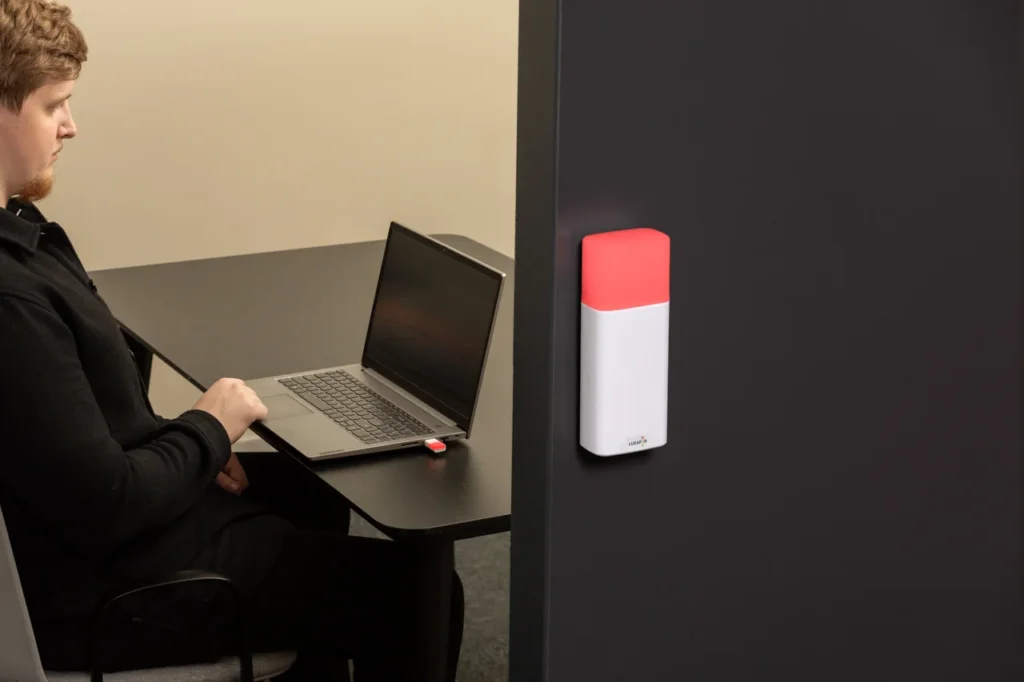
It is even worse if they are remote workers. They can easily get disturbed by loved ones when their home turns into an office. In order to deal with interruptions, you can suggest tools such as Luxafor Bluetooth or Luxafor Flag that will help them increase productivity while still maintaining the work-life balance. Either way, this is why you have to check on them from time to time and also get their feedback.
7. Connect both remote and non-remote employees
Working remotely can make your employees feel lonely and disconnected from others. It is your duty as the manager to ensure that they don’t feel the way. You have to connect all your workers (both remote and non-remote workers). Research by McKinsey Global Institute discovered that companies that link their employees have up to 20-25% more productivity.
Your employees would find it challenging to create or maintain personal connections when they don’t work together in a central office—no lunch breaks or water cooler talks. However, the fact that they are working from home does not mean they should lose that connection or feel disconnected.
You only have to create a virtual space for all your employees to connect and share their insights, business trends, best practices that they find interesting.
Conclusions
Companies are looking for ways to continue to work and ensure employee productivity during this pandemic. This has increased the strain on the managers. They now have more work to do to ensure that everything works accordingly, and they maintain productivity during this pandemic.
Do you want to build and maintain new habits? Get your free PDF version of the Don't Break The Chain calendar and start today!
Do you want to build and maintain new habits? Get your free PDF version of the Don't Break The Chain calendar and start today!
Author's Bio
Kurt Walker has been working as an editor and a copywriter at college paper.org reviews in London for 3 years, where he provides assignment writing service and finance assignment help. He is also a professional content writer and journalist in such topics as inspiration, productivity, education, and technologies.
Productivity During the Pandemic: 7 Tips for Managers to Share




Busy Tag – Your Digital Canvas



Tags
Archives
- June 2026
- May 2026
- March 2026
- January 2026
- December 2025
- November 2025
- October 2025
- September 2025
- August 2025
- July 2025
- June 2025
- May 2025
- February 2025
- January 2025
- December 2024
- November 2024
- October 2024
- September 2024
- August 2024
- July 2024
- June 2024
- May 2024
- April 2024
- March 2024
- February 2024
- January 2024
- December 2023
- November 2023
- October 2023
- September 2023
- August 2023
- July 2023
- June 2023
- May 2023
- April 2023
- March 2023
- February 2023
- January 2023
- December 2022
- November 2022
- October 2022
- September 2022
- August 2022
- July 2022
- June 2022
- May 2022
- April 2022
- March 2022
- February 2022
- January 2022
- December 2021
- November 2021
- October 2021
- September 2021
- August 2021
- July 2021
- June 2021
- May 2021
- April 2021
- March 2021
- February 2021
- January 2021
- December 2020
- November 2020
- October 2020
- September 2020
- August 2020
- July 2020
- June 2020
- May 2020
- April 2020
- March 2020
- December 2019
- November 2019
- October 2019
- September 2019
- August 2019
- July 2019
- April 2019
- March 2019
- January 2019
- December 2018
- November 2018
- October 2018
- September 2018
- August 2018
- July 2018
- June 2018
- August 2017
- May 2017
- April 2017
- February 2017
- January 2017
- November 2016
- October 2016
- September 2016
- August 2016
- July 2016
- June 2016
- May 2016
- April 2016
- March 2016
- February 2016
- January 2016

